PentestHint - Cyber Shield Student Program (P-CSSP)

- Description
- Curriculum
- Reviews
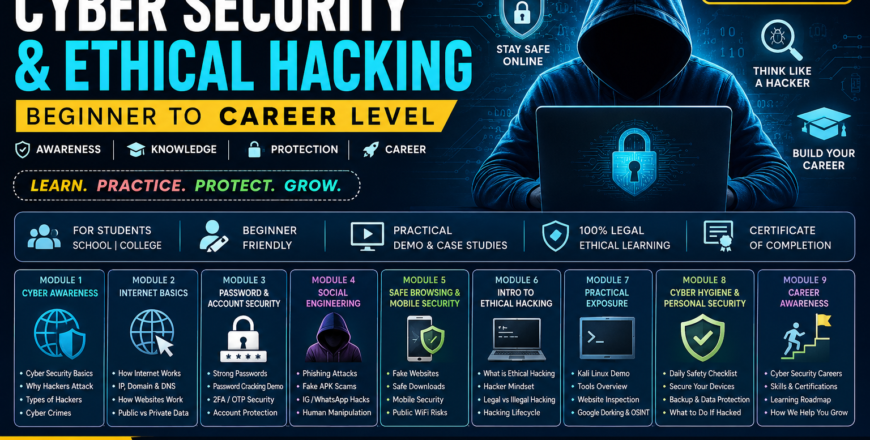
The Cyber Security & Ethical Hacking – Beginner to Career Level course is designed specifically for school and college students who want to understand the digital world, online safety, and the foundations of ethical hacking in a simple, practical, and engaging way. This course focuses on building strong cyber awareness, safe internet habits, and beginner-level cybersecurity knowledge through real-world examples, demonstrations, and case studies.
The program covers essential topics such as cyber awareness, password security, phishing attacks, fake websites, mobile security, social engineering, ethical hacking basics, safe browsing, OSINT introduction, and cybersecurity career guidance. The content is delivered in an easy-to-understand manner so even complete beginners with no technical background can confidently start their cybersecurity journey.
Students will also gain practical exposure through demonstrations including fake login page awareness, password security concepts, Google Dorking introduction, basic website inspection, and cybersecurity safety practices. The course emphasizes responsible and ethical learning while helping students understand modern cyber threats and how to protect themselves online.
This course is ideal for students who want to build digital awareness, improve personal security, explore ethical hacking fundamentals, and discover career opportunities in the cybersecurity industry.
-
1
 What is Cyber Security?
This lesson introduces students to the world of cyber security in the easiest and most relatable way. Students will understand how cyber security protects mobile phones, social media accounts, games, websites, and personal information from hackers and online threats.
The session uses real-life examples from daily student activities like Instagram, WhatsApp, online gaming, and online payments so learners can connect cybersecurity concepts with their own digital life.
-
2
Why Hackers Attack?
This lesson explains the real reasons why hackers attack individuals, students, businesses, and organizations. Students will learn that hacking is not always about “movies” or “coding,” but often about money, data theft, revenge, scams, and manipulation.
Real-world cybercrime stories and relatable examples help students understand the mindset behind cyber attacks and how common users become victims online.
-
3
Types of Hackers (White, Black, Grey Hat)
Students will learn about different types of hackers and how ethical hacking differs from illegal hacking. This lesson removes misconceptions and introduces students to ethical hackers who work to secure systems legally.
The session also explains cybercrime risks and the legal consequences of unauthorized hacking activities.
-
4
Cyber Crimes Students Should Know
This lesson focuses on modern cybercrimes that directly target students and teenagers. Students will understand how scams, fake apps, cyberbullying, OTP frauds, and social media traps are commonly used against young internet users.
The goal is to build awareness so students can identify dangerous online activities before becoming victims.
-
5
How Internet Works
This lesson explains the internet in a simple visual and beginner-friendly manner. Students will learn how devices communicate across the internet and how websites, apps, and online games actually work behind the scenes.
Animations and real-life examples make networking concepts easy to understand even for complete beginners.
-
6
What is IP Address?
Students will learn what an IP address is and why every device connected to the internet needs one. Practical demonstrations help learners understand public and private IP addresses in a simple way.
The session also introduces online privacy concepts related to IP exposure.
-
7
What is Domain & DNS?
This lesson explains how domain names and DNS make the internet easier for humans to use. Students will understand how websites are connected to IP addresses through DNS systems.
The session simplifies technical networking concepts into easy examples students can relate to daily browsing activities.
-
8
What happens when you open Google.com?
Students will explore the complete journey that happens when someone types a website URL into a browser. This lesson visually explains how requests move across servers and how websites finally load on the screen.
The topic builds curiosity and gives students foundational technical understanding.
-
9
Public vs Private Data
This lesson teaches students how to differentiate between public information and sensitive private data. Students will understand what should never be shared online and how oversharing creates cyber risks.
The session strongly focuses on digital privacy and social media awareness.
-
10
Why Passwords Get Hacked
Students will learn common reasons why passwords get compromised and how hackers exploit weak passwords. The session explains password attacks in a beginner-friendly and awareness-focused manner.
Real examples help students understand why strong authentication matters today.
-
11
Strong Password Creation Method
This lesson teaches students how to create strong and memorable passwords without making them difficult to remember. Practical methods and examples help students immediately improve their online account security.
-
12
Password Cracking Demo
Students will watch a safe and controlled demonstration showing how weak passwords can be cracked quickly. The lesson is awareness-focused and designed to encourage better password habits.
-
13
What is 2FA / OTP Security
This lesson explains two-factor authentication (2FA) and OTP security in simple terms. Students will understand why OTPs should never be shared and how 2FA protects accounts from hackers.
-
14
Social Media Account Protection Guide
Students will learn how to secure Instagram, WhatsApp, Facebook, and gaming accounts using practical safety measures and privacy settings.
-
15
What is Social Engineering?
This lesson introduces social engineering and explains how hackers manipulate human psychology instead of targeting systems directly.
-
16
Phishing Attack
Students will learn how phishing attacks work through emails, SMS messages, and fake login pages. Practical examples help learners identify suspicious messages safely.
-
17
Fake APK / App Scam
This lesson explains how fake apps and APK files are used to steal information from users. Students will understand the risks of downloading apps from unknown sources.
-
18
Instagram / WhatsApp Hacking Tricks Explained
Students will learn about common tricks used by scammers to compromise social media accounts and messaging platforms.
-
19
How Hackers Manipulate People
This lesson focuses on psychological manipulation techniques used in cybercrime and how students can avoid becoming victims.
-
20
How to Identify Fake Websites
This lesson teaches students how to identify fake and dangerous websites before entering passwords, OTPs, or personal information. Students will learn how scammers create fake banking, gaming, and social media websites to steal accounts and money.
The session focuses on practical awareness using real examples and visual comparisons between genuine and fake websites.
-
21
Safe Download Practices (APK, Games)
Students will learn safe methods for downloading games, software, APKs, and study materials from the internet. The lesson explains how malware spreads through cracked software, mod APKs, and fake download buttons.
The goal is to help students avoid accidental malware infections and protect their devices from harmful applications.
-
22
Android Security Basics
This lesson introduces students to Android security fundamentals and explains how smartphones can become targets for hackers and scammers.
Students will understand basic mobile security practices to protect personal data, photos, social media accounts, and financial applications.
-
23
Permissions You Should Never Allow
Students will learn why app permissions matter and how dangerous permissions can lead to privacy risks, spying, and data theft.
The lesson explains common permission abuse scenarios in a simple and relatable manner.
-
24
Public WiFi Risks Explained
This lesson explains how public WiFi networks in malls, cafes, airports, and schools can expose users to cyber risks.
Students will understand how attackers monitor unsecured networks and what precautions should be taken while using public internet connections.
-
25
What is Ethical Hacking?
Students will learn the meaning of ethical hacking and how cybersecurity professionals legally identify vulnerabilities to improve security.
This lesson introduces ethical hacking as a professional career field rather than illegal cyber activity.
-
26
Hacker Mindset Explained
This lesson helps students understand how hackers think, observe weaknesses, and exploit human or technical mistakes.
The focus is on developing a defensive mindset and understanding attacker perspectives for awareness purposes.
-
27
Legal vs Illegal Hacking
Students will clearly understand the difference between authorized ethical hacking and illegal cybercrime activities.
The lesson also explains cyber laws, digital responsibility, and ethical boundaries in cybersecurity.
-
28
Basic Hacking Lifecycle (Recon → Exploit → Report)
This lesson introduces students to the basic phases of ethical hacking using simple explanations and safe examples.
Students will gain foundational knowledge of how professional security assessments are generally structured.
-
29
Introduction to Kali Linux
Students will get a beginner-friendly introduction to Kali Linux and understand why cybersecurity professionals use Linux-based environments for security testing.
The lesson is demonstration-focused and designed only for awareness and exposure.
-
30
Basic Tools Overview
This lesson introduces students to common cybersecurity tools used by professionals for security testing and analysis.
Students will only learn the purpose of tools without deep technical execution.
-
31
Simple Website Inspection
Students will learn how websites are built using HTML and how browser “View Source” features work.
This lesson introduces basic curiosity-driven exploration without any harmful activities.
-
32
Google Dorking (Safe Use Only)
This lesson explains how advanced Google search techniques work and how search engines can reveal public information accidentally exposed online.
The session focuses only on safe and ethical awareness.
-
33
Finding Public Information
Students will learn how publicly available information can be collected from the internet and why privacy awareness is important.
This lesson introduces Open Source Intelligence (OSINT) concepts in a beginner-friendly manner.
-
34
Daily Cyber Safety Checklist
This lesson provides students with simple daily cybersecurity habits that can significantly reduce cyber risks.
Students will learn practical steps for maintaining safe digital behavior every day.
-
35
How to Secure Your Phone in 5 Minutes
Students will learn quick and practical methods to improve smartphone security using built-in Android and iPhone features.
-
36
How to Secure Your Laptop
This lesson explains basic laptop security practices to protect personal files, study material, and online accounts.
-
37
Backup & Data Protection Basics
Students will understand the importance of backups and how data loss can happen through malware, accidental deletion, or device theft.
-
38
What to Do If You Get Hacked
This lesson teaches students the immediate steps they should take if their social media account, phone, or email gets compromised.
-
39
Careers in Cyber Security
Students will explore different cybersecurity career paths and understand how the industry offers opportunities for beginners, technical learners, and problem solvers.
-
40
Skills Required to Become Hacker
This lesson explains the important technical and non-technical skills required to build a successful career in cybersecurity and ethical hacking.
-
41
Certifications Explained (CEH, OSCP)
Students will get a beginner-friendly introduction to popular cybersecurity certifications and understand how certifications help in career growth.
-
42
How Students Can Start Learning (Roadmap)
This lesson provides a simple roadmap for students who want to begin learning cybersecurity from scratch.
-
43
How PentestHint Will Help You Grow
Students will understand how structured mentorship, practical exposure, projects, and guided learning can help them grow in cybersecurity.

| Category | Details |
|---|
| Course Name | Cyber Security & Ethical Hacking – Beginner to Career Level |
| Course Type | Beginner to Intermediate |
| Mode | Online Recorded Video Course |
| Total Modules | 9 Main Modules + Bonus Sessions |
| Learning Style | Theory + Practical Awareness Demonstrations |
| Difficulty Level | Beginner Friendly |
| Language | Hinglish / Easy English |
| Practical Exposure | Safe Demonstrations & Awareness-Based Activities |
| Certificate | Yes |
| Suitable For | School Students, College Students, Beginners |
- No prior cybersecurity knowledge required
- Basic understanding of smartphones and internet usage
- Laptop, desktop, tablet, or smartphone for accessing videos
- Internet connection for course access
- Interest in cybersecurity, ethical hacking, or digital safety
- Willingness to learn ethical and responsible cybersecurity practices
- School students interested in technology and cybersecurity
- College students exploring ethical hacking and cyber awareness
- Beginners with no technical background
- Students wanting to improve online safety and privacy
- Parents who want children to learn safe internet practices
- Aspiring ethical hackers looking for a beginner roadmap
- Learners interested in cybersecurity careers
- Individuals wanting practical awareness about scams, phishing, and social engineering